Sessions & handoff#
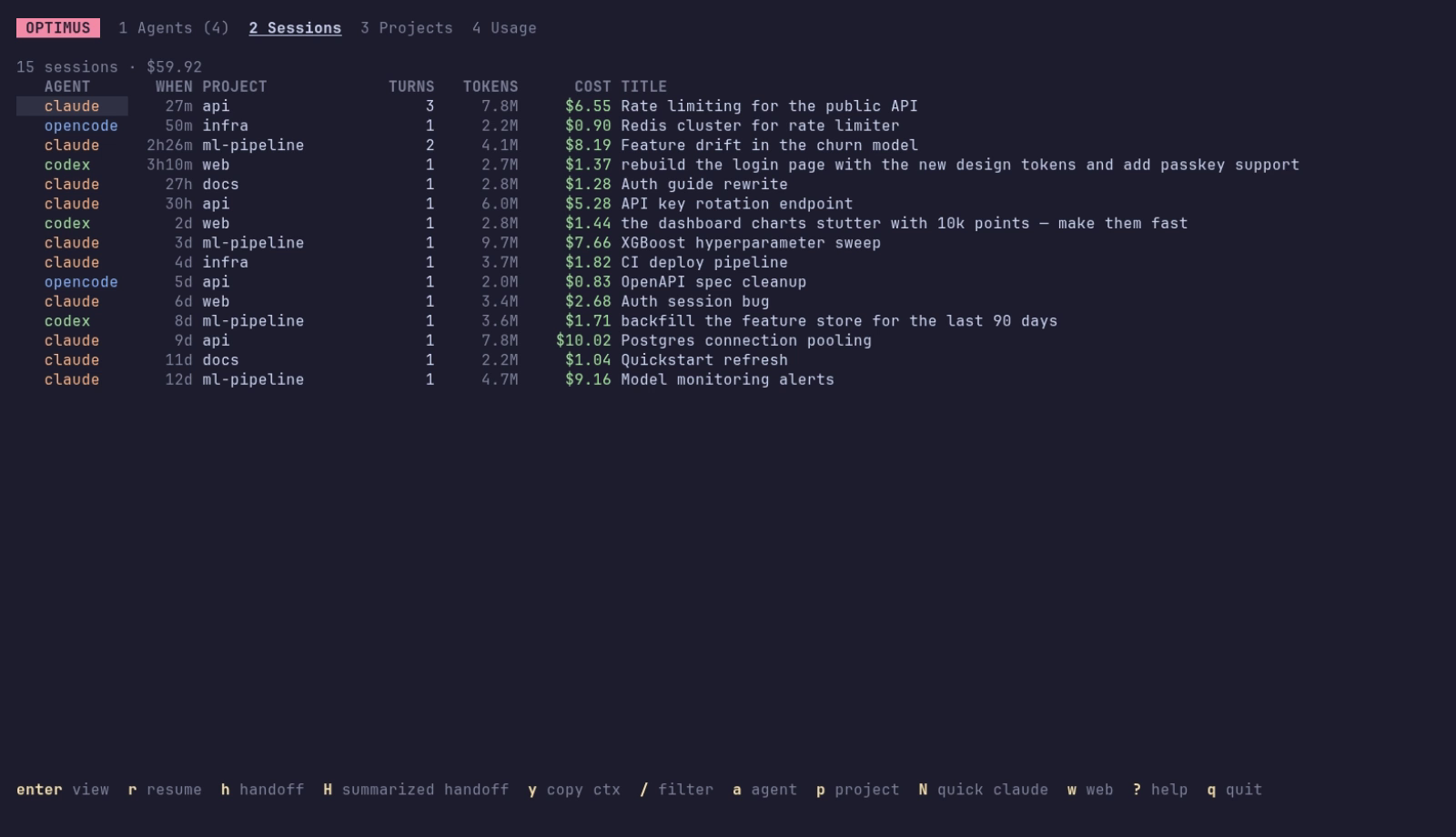
Every session, every agent#
optimus ls                      # newest first
optimus ls -p api -a codex      # filter by project and agent
optimus ls --live --json        # only running sessions, as JSON
optimus show last --tail 20     # a transcript
Automated sessions#
Sessions started by scripts and schedulers (claude -p, Agent SDK runs, codex exec, cron jobs) are marked automated and hidden from session lists by default. They still count in costs and usage.
| Where | Show them |
|---|---|
| shell | optimus ls --all |
| terminal dashboard | Z in Sessions (shown with ⚙) |
| browser | the automated checkbox |
Search inside transcripts#
Find the session where something was discussed, by what was said rather than its title:
optimus search "connection pool"     # newest first, with the matching passage
optimus search kafka -n 5 --json
In the terminal dashboard press Shift+S in Sessions; in the browser tick inside transcripts next to the search box. Matching passages replace the titles; Esc clears the search.
optimus reads each agent's own history:
| Agent | Source | Notes |
|---|---|---|
| Claude Code | ~/.claude/projects/*/*.jsonl |
sub-agent transcripts counted toward their parent session; AI titles; live sessions from ~/.claude/sessions |
| Codex CLI | ~/.codex/sessions/**/rollout-*.jsonl |
token deltas from cumulative counts; plan quota from rate-limit events |
| opencode | ~/.local/share/opencode/storage |
per-message tokens and cost |
Parsed sessions are cached in ~/.cache/optimus/index.gob, keyed by file size and modification time, so a large history (multi-GB) is only fully read once. optimus reindex rebuilds the cache.
Resume#
R in Sessions, Resume on the web, or:
This reopens the session inside the fleet (claude --resume, codex resume, opencode --session, …). If it's already open in optimus, you're taken to its window.
If the session is still running somewhere else (another terminal tab, your own tmux), optimus won't start a second copy: two processes writing one transcript corrupt it. The terminal dashboard offers to take it over instead, and the CLI says how (optimus takeover <pid>).
Inside a window, /clear, /resume and forks switch Claude Code to another session; the window follows it, so cost, transcript and handoff are always those of the session actually running.
Handoff#
A handoff turns a session into a context document another agent can pick up from:
# Handoff: Rate limiting for the public API
| Session | `13e1…` (claude) | Project | `~/dev/api` | Branch | `main` | …
## Original request
## Files changed            ← from edit tool calls, newest first
## Files consulted
## Recent commands
## Conversation (most recent)   ← newest messages that fit the token budget
## Where it left off            ← the latest request, and a reminder to verify state
Send it wherever you need:
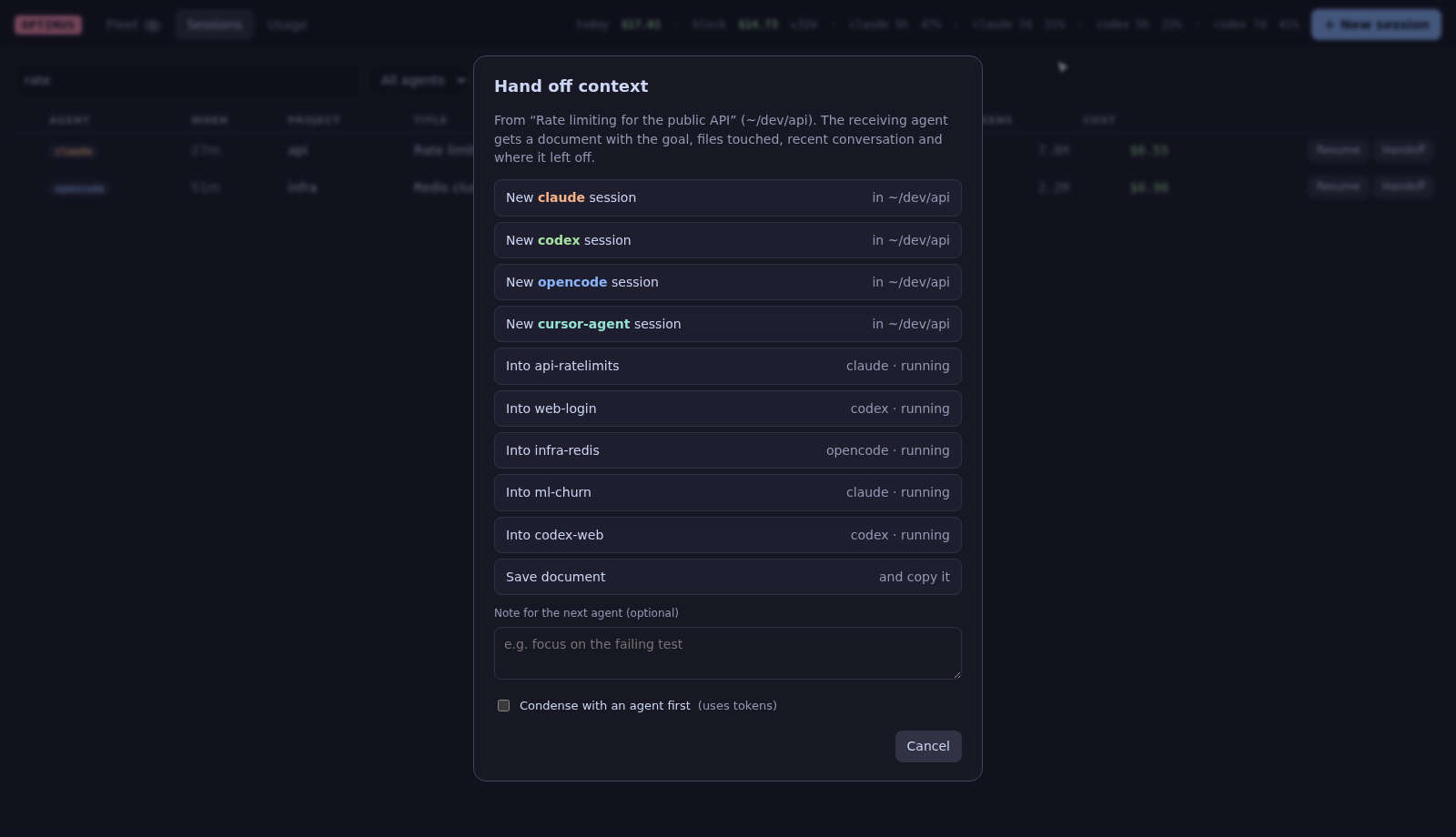
H on a session or agent opens the target picker: new <agent> session, into a running agent, copy to clipboard, or save to file. Shift+H condenses the document with an agent first.
Handoff on a session row, in a transcript, or on the selected agent. Add a note for the next agent, and optionally condense it.
Review before sending#
Check (and edit) exactly what the next agent will read:
- Terminal dashboard: pick ✎ preview & edit first in the target picker. The document opens in
$EDITOR; save, close, then choose where to send it. - Browser: open ✎ Preview & edit the document in the Handoff dialog, edit, then click a target.
- Shell:
optimus handoff 3f2a --to codex --edit.
When quota runs low#
When an agent's plan quota window reaches handoff_suggest_pct (default 85%), optimus suggests continuing its running sessions in another agent, Claude ↔ Codex by default:
- a notification once per session and quota window,
- a banner in both dashboards: Shift+C in the terminal dashboard, Continue in codex in the browser.
Change the target per agent with "handoff_suggest_to": {"claude": "opencode"} in the config. Claude quota needs the status line hooked up (optimus config statusline --install); Codex reports it on its own.
The document is saved in ~/.local/state/optimus/handoffs/. The receiving agent gets a one-line prompt pointing to it ("Read the handoff document at … then continue"), which works the same for every agent and never hits argument or paste-size limits.
Token budget
handoff_max_tokens (default 20 000) caps the document size. Long messages are cut with a marker, and the oldest conversation goes first. --summarize asks summarize_with (default claude) for a structured brief instead, which uses tokens.